
Hop Hop Hop Dance AI Generator
Replace the front character, or both dancers, in this five-second cartoon clip. Your images define their faces, bodies and outfits; the original video guides every move, the scene and the camera.
Sign in and use your video credits to generate. One credit makes one five-second video with the original music.
Both images are required. Image 1 → A, front right. Image 2 → B, back left. Identities stay with their original roles throughout the clip.
Match your characters
Add a photo to get startedPreview your photos, then sign in and buy video credits to generate. Selecting photos does not start a charge.
Sign in to generateJPG, PNG or WebP · 10 MB per photo. You can also drop a file here.
More templates
Same idea, other viral clips. One photo per person.
One clip. Two clear roles.
At the start of the reference, A is the large character close to the camera on the right. B is the blond character farther back on the left. Choose which appearances to replace while preserving their movements.
Images supply faces, hairstyles, body proportions and clothes. The video supplies movement, timing, paths, occlusion, lighting and composition.
Check my photos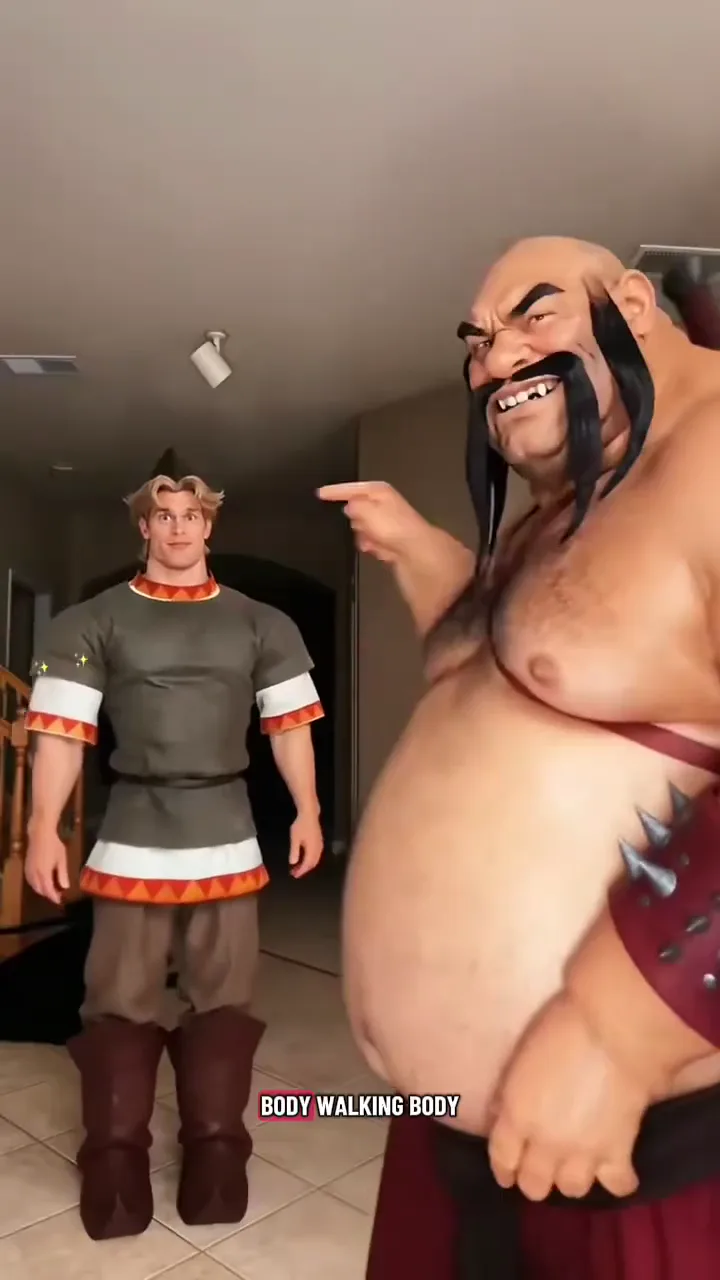
Follow the original five seconds
- 01
Sway
A follows the foreground character’s body movement and timing.
- 02
Raise a hand
Keep the original hand movement and its timing relative to B.
- 03
Lean and crouch
A leans forward while B follows the original crouch and subsequent movement.
- 04
Follow the original cut
Keep the cut around 4.4 seconds: B moves to the foreground and A to the background. Their identities and outfits stay consistent.
Prepare the character replacement
- 01
Choose A or A + B
Replace A only with one image and keep B unchanged. To replace both, supply image 1 for A and image 2 for B.
- 02
Show the whole character
Use a clear reference showing one character’s face, hair, proportions and outfit. Avoid tight face-only crops.
- 03
Check the mapping
Sign in, buy video credits and check A and B before generating. We add the original soundtrack to your five-second video.
A better photo makes a better starting point
Keep it clear
- One character per image; face and hairstyle clearly visible.
- Show the body proportions and the outfit you want to keep.
- JPG, PNG or WebP, up to 10 MB per photo.
Skip the guesswork
- Sunglasses, covered faces and strong beauty filters.
- Dark, blurry shots or faces cropped at the edge.
- Photos of anyone who has not agreed to take part.
Keep the scene. Replace the characters.
Generation follows the original scene, framing and cut in a five-second 9:16 clip. The original music is added automatically, ready to play and download.
Pricing
One, five or ten videos
One-time video packs in USD. Every video is five seconds at 720p; choose the quantity you need.
Single
$4.99
5 seconds · 720p
- Vertical 9:16 MP4
- Download your finished MP4
- Unused generation credits do not expire
- One-time payment, no subscription
Five Pack
$19.90
5 seconds · 720p
- Vertical 9:16 MP4
- Download your finished MP4
- Unused generation credits do not expire
- One-time payment, no subscription
Ten Pack
$29.90
5 seconds · 720p
- Vertical 9:16 MP4
- Download your finished MP4
- Unused generation credits do not expire
- One-time payment, no subscription
Hop Hop Hop Dance FAQ
What happens when I upload only one image?
Choose Replace A only. Image 1 replaces the whole foreground character A; the original blond character B stays unchanged. Replace A + B requires two images.
Is the cartoon video made from my photos?
No. It is a fixed five-second reference clip. Selecting photos changes your photo previews, not the example video.
Do I need an app or editing software?
Choose photos, buy credits, generate and download in your browser. The server adds the original music automatically; no video editor is needed.
Will the finished video include the original music?
Yes. Mini generates the picture, then the server copies the original soundtrack into the finished video. It does not generate new music or dialogue.
Can I generate or buy a video now?
Yes. Sign in and purchase a pack of 1, 5 or 10 videos. Each generation uses one account credit; unused credits do not expire. You do not need an administrator account.
What happens to the photos I select?
Selecting a photo creates a local browser preview. Phone transfer temporarily relays it through this site. When you submit a generation, the selected images and reference clip go to Kie. Your finished video is accessible through your signed-in account.
Your turn to hop
Choose a new look for A, or give both characters their own reference image. Keep the five-second dance and make the characters yours.
Check my photosHop Hop Hop Dance is an independent project, not affiliated with TikTok or the creators of the trend. The cartoon clip is a dance reference. Label AI-made videos when you share them.